
Reporting The Page:
It’s simple: the more reports come in; the more likelihood that Facebook will take a serious look at this page – maybe. Facebook’s policy on these things seems a little – uh – inconsistent.
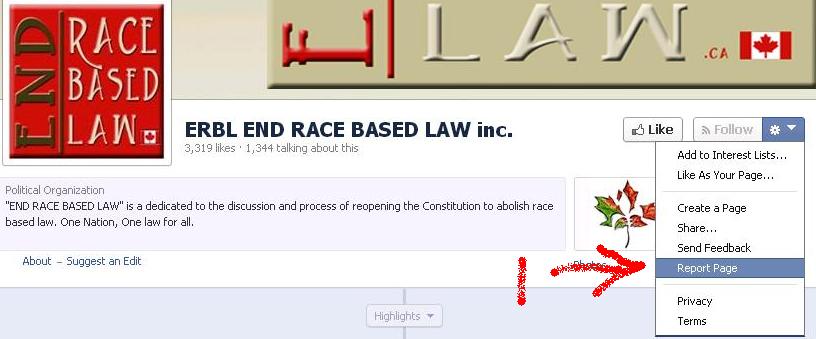
1) Visit the Page and click the little cog on the top right of the Page. Click “Report Page”.
2) Selection the option “I think it shouldn’t be on Facebook”, then click “Continue”

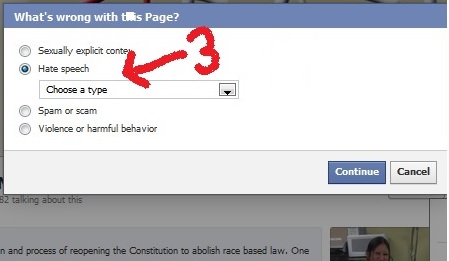
3) Selection the option “Hate Speech” and a new drop down box will appear
 \
\
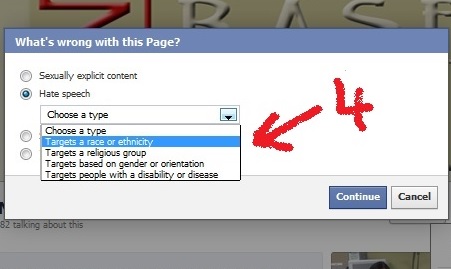
4) Select “Targets a Race or Ethnicity” and click continue
5) On the next screen TICK the box to report it to Facebook.

If it is NOT ticked, the report will cancel
Once you have ticked the box, click “Continue”.
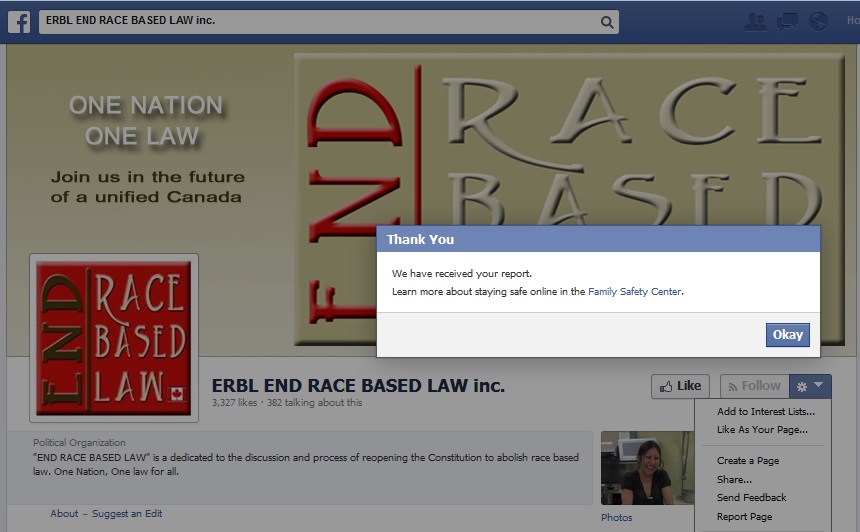
6) A message titled “Thank You” and saying that your report has been received is the end of this process.
After your report is “Reviewed”
Shortly after, you will receive a notice that the report had been reviewed.
If you click it (or navigate to your support dashboard) you will see the review. It will say “This page wasn’t removed” and that “We reviewed the page you reported for containing hate speech or symbols and found it doesn’t violate our Community Standards.”

This is when you ask your friends report it as well. Please this briefing with them and ask them to help report the hate.
When you do this, please take a moment to explain why this is important. It’s people power that will make the difference.
You can also join our Facebook page, SHUT ERBL DOWN, to follow our future work combating online hate.
What we see coming from Facebook is not satisfactory. Hopefully at some point, they’ll start looking at enforcing their own Community Standards.
Reporting A Picture
(Most Postings are in fact Pictures – it’s how ERBL gets away with posting so many gross statements as comments on seemingly innocent pictures)
1) Click on the Picture to go to the Timeline Photo version of the picture”
2) Use your mouse to go to the bottom of the picture, where “Options” will pop up. Click on “Report”

3) In the box that pops up, choose the “I think it shouldn’t be on Facebook” option and click “Continue
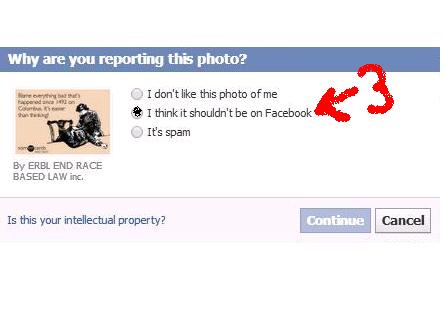
4) When asked what’s wrong with this photo, select “Hate speech or symbol”and click “Continue”.

5) On the next page you are given an option to report the image.. Note that the option is NOT ticked by default. We wonder how many reports get dropped because of this..
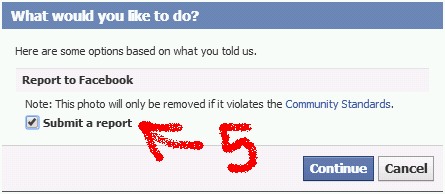
Make sure you TICK the box, then click “Continue.”
6) You will now get a message that “We’re sorry that you’ve had this experience. We’ll review this photo and if it violates our Community Standards, we’ll remove it.” Click OK and you are done reporting this image.

Reporting A Comment:
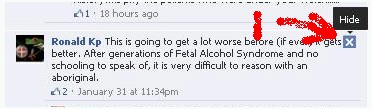
1) Click on the “X” on the upper right side of the comment for “Hide”:
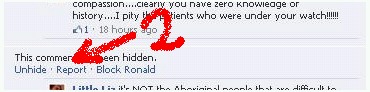
2) You will get a prompt that says “This comment has been hidden” Click the “Report” in that prompt:
3) In the box that pops up “Is this comment about you or a friend?”, choose the “Hate speech option and then the type, then click “Continue”
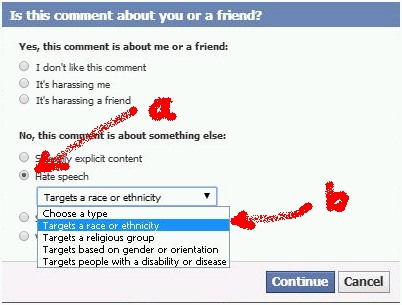
4) The next box is “What You Can Do”. Whatever you do, make sure to tick the “Report to Facebook” box – or there won’t be a report. Then press “Continue.”

5)On the next page you are get a confirmation that Facebook has received your report.

Make sure you press “Okay”
These instructions are provided by SHUT ERBL DOWN in the hope of ending hate speech on the internet
Please feel free to join our Facebook page, Shut ERBL Down to stay updated on our campaign to end this racism against Canada’s First Nations
The approach is based on the approach of Australia’s Online Hate Prevention Institute (www.ohpi.org.au / www.facebook.com/onlinehate) to facilitate public reporting of Internet racism and other forms of online hate.
OHPI does excellent work combating a wide variety of forms of online hate, and we encourage you to visit their website and to support them on Facebook.
Posted by auntiethis | Filed under AuntieThis
 auntiethis